
Accessing the new Now Book It
On your first login to the new Now Book It, you will need to set a new password. To do so you will need access to receive email on your login email address. For more information on this click here
Note: You can still access the old admin and diary for a short period of time using your email and old password.
Access the new Now Book It here
You will need to access the new platform on the new URL's listed below they it will be replacing the old URL's, which will be decommissioned soon.
-
app.nowbookit.com - Australia and rest of world
-
app.nowbookit.ca - Canadian Restaurants
-
app.nowbookit.us - US Restaurants
Logging in for the first time
When you first log in to app.nowbookit.com, we'll email you a link to set a new password. This is sent to your login email, so make sure you can access it.
- Your username (email address) stays the same.
- Your new password can be different from your old one, at least 12 characters, contain and upper case, lower case, number and special character.
After you have logged in for the first time you have the option to setup Multi-Factor authentication from the your user profile screen.
Organisations & Venues
When you log in, you'll see the Organisations you're connected to. Select the one you want to get started with.
No more separate logins for multiple Organisations. To switch Venues or Organisations, click your user details in the bottom left and if you have access to more than one account or venue, select the one you want to access using the switcher arrows.

See more details on user management here
Home page
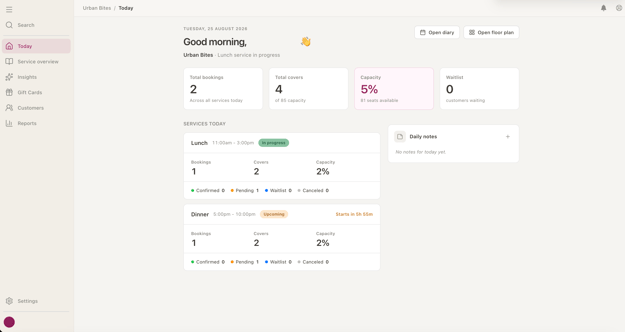
Once you're in, you'll land on the Today view. This gives you an overview of your day ahead.
Diary and floorplan views
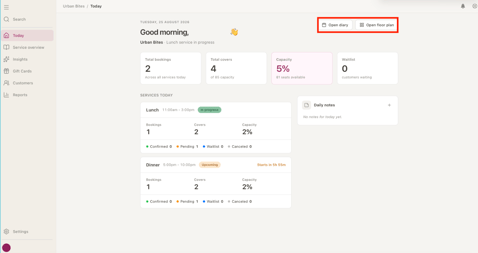
Open your Diary and Floor Plan views in the same window - no need to log in again.
You can select this from the top of your Today screen.
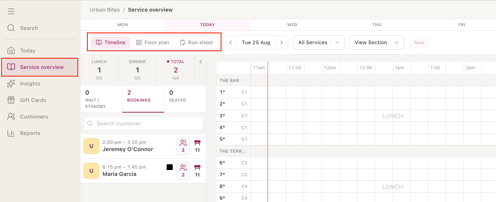
Or the Service Overview section in the static menu on the left hand side.
Select between Timeline, Floor plan and run sheet views to manage your service.
Settings
Venue Settings
To access all of your venue settings in the one place, select the setting icon in the bottom left of the menu when you have any venue open. More info on Venue Settings

Organisation Settings
To access all of your organisation settings in the one place, select your user icon in the bottom left of the menu, then click on your organisation. More info on Organisation Settings

User Settings
To access all of your profile settings as well as security and passwords, select your user icon in the bottom left of the menu, the click on your user name. More info on User Profile Settings
