---
title: Diary Overview
description: Using diary and floorplan
---
[Skip to content](https://help.nowbookit.com/knowledge-base/diary-overview#main-content)
English
Show submenu for translations

Open main navigation
Close main navigation
- English
Show submenu for translations
How can we help you?
- There are no suggestions because the search field is empty.
1. [Knowledge Base](https://help.nowbookit.com/knowledge-base?hsLang=en)
2. [Venue](https://help.nowbookit.com/knowledge-base/venue?hsLang=en)
3. [Diary](https://help.nowbookit.com/knowledge-base/venue?hsLang=en#diary)
# Diary Overview
## See where you find your diary and your different views available
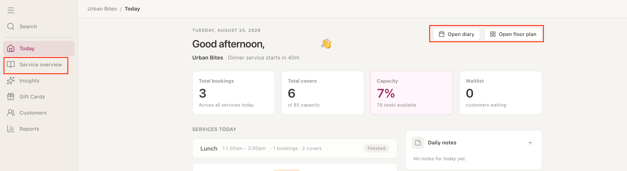
Access the diary from the Today screen by either selecting the Service Overview from the side menu or from the quick action buttons on the top right of the screen.
### Service Overview
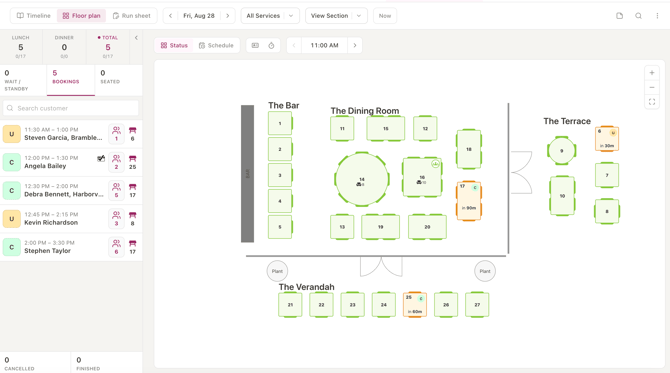
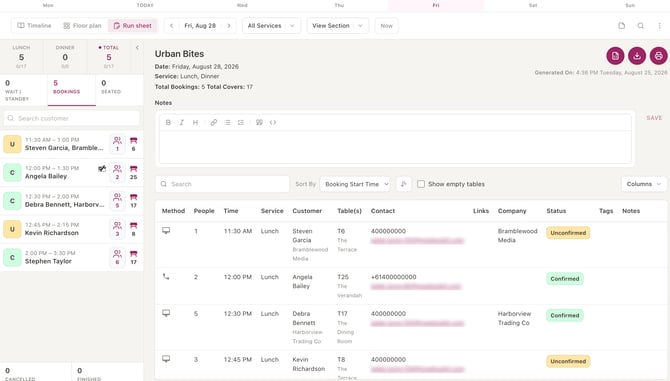
Default is Timeline View. You can select your preferred view by toggling between Timeline, Floor plan and Run sheet.
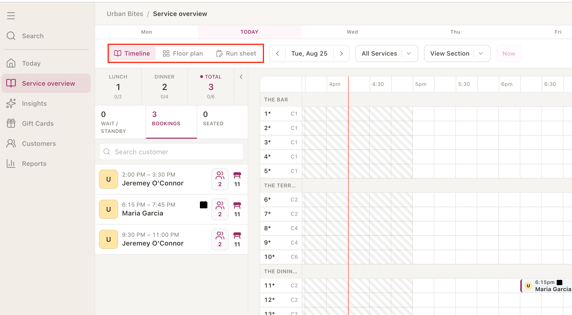
Land on the current date and service as default. If you want to view a different day, click through the date scroll or select one of the upcoming days from the tabs at the top of the Diary.

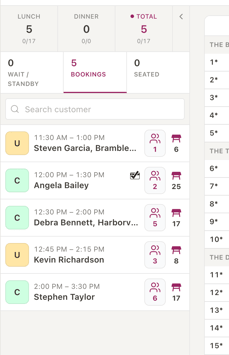
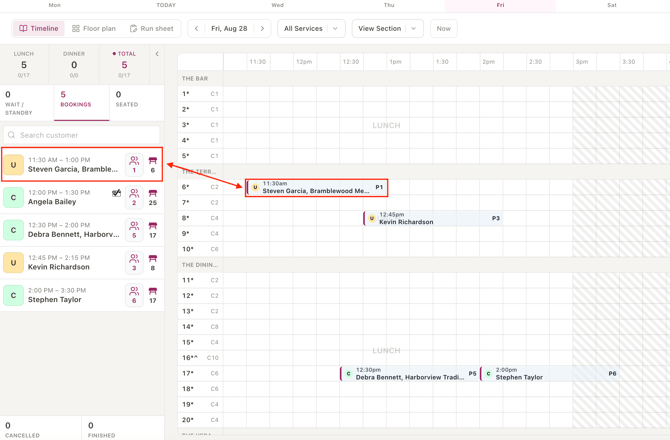
On the left hand side, details of bookings for that day will show. At a glance you can see pax, booking status, table number and whether a pre-auth has been added. Click the booking to see more details open in the right of the screen.
Details on bookings also show in the in Timeline view, split into sections and times.
### Floor Plan View
### Run Sheet View
- [Getting Started](https://help.nowbookit.com/knowledge-base/getting-started?hsLang=en#main-content)
- [Organisation Settings](https://help.nowbookit.com/knowledge-base/getting-started?hsLang=en#organisation-settings)
- [Venue Settings](https://help.nowbookit.com/knowledge-base/getting-started?hsLang=en#venue-settings)
- [Customisation](https://help.nowbookit.com/knowledge-base/getting-started?hsLang=en#customisation)
- [Today](https://help.nowbookit.com/knowledge-base/getting-started?hsLang=en#today)
- [Venue](https://help.nowbookit.com/knowledge-base/venue?hsLang=en#main-content)
- [Bookings](https://help.nowbookit.com/knowledge-base/venue?hsLang=en#bookings)
- [Diary](https://help.nowbookit.com/knowledge-base/venue?hsLang=en#diary)
- [Tables](https://help.nowbookit.com/knowledge-base/venue?hsLang=en#tables)
- [Take Away](https://help.nowbookit.com/knowledge-base/venue?hsLang=en#take-away)
- [Events & Functions](https://help.nowbookit.com/knowledge-base/events-functions?hsLang=en#main-content)
- [Events](https://help.nowbookit.com/knowledge-base/events-functions?hsLang=en#events)
- [Payments and Gift Cards](https://help.nowbookit.com/knowledge-base/payments-and-gift-cards?hsLang=en#main-content)
- [Gift Cards](https://help.nowbookit.com/knowledge-base/payments-and-gift-cards?hsLang=en#gift-cards)
- [Payments](https://help.nowbookit.com/knowledge-base/payments-and-gift-cards?hsLang=en#payments)
- [Integrations](https://help.nowbookit.com/knowledge-base/integrations?hsLang=en#main-content)
- [POS Integrations](https://help.nowbookit.com/knowledge-base/integrations?hsLang=en#pos-integrations)
- [Other Integrations](https://help.nowbookit.com/knowledge-base/integrations?hsLang=en#other-integrations)
- [Reporting](https://help.nowbookit.com/knowledge-base/reporting?hsLang=en#main-content)
- [NBInsights](https://help.nowbookit.com/knowledge-base/reporting?hsLang=en#nbinsights)
- [CRM](https://help.nowbookit.com/knowledge-base/crm?hsLang=en)
[](http://nowbookit.com)
Need more assistance?
email: [help@nowbookit.com](mailto:help@nowbookit.com)
Call us:
- Australia: [1800 265 726](tel:1800265726)
- New Zealand: [0800 453 933](tel:0800453933)
- United States: [1 469 458 6874](tel:14694586874)
- Canada: [1 438 794 9945](tel:14387949945)
- International: [+61 2 7912 1576](tel:61279121576)
[mailto:help@nowbookit.com](mailto:help@nowbookit.com)
Copyright © 2026, Now Book It