---
title: Edit the Widget Description in a Service or Event
description: How to update a widget description in a service or event.
---
[Skip to content](https://help.nowbookit.com/edit-the-widget-description-in-a-service-or-event#main-content)
English
Show submenu for translations
[](https://nowbookit.com)
Open main navigation
Close main navigation
- English
Show submenu for translations
- [New Now Book It Experience](https://help.nowbookit.com/knowledge-base)
[New Now Book It Experience](https://help.nowbookit.com/knowledge-base?hsLang=en)
How can we help you?
- There are no suggestions because the search field is empty.
1. [Help Centre](https://help.nowbookit.com/?hsLang=en)
2. [Configuration and Communication](https://help.nowbookit.com/configuration-and-communication?hsLang=en)
3. [Booking Widget Customisation](https://help.nowbookit.com/configuration-and-communication?hsLang=en#booking-widget-customisation)
# Edit the Widget Description in a Service or Event
## How to create or edit a Widget Description
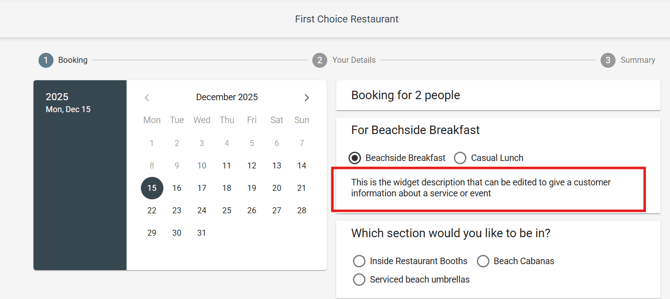
The widget description provides information about the service or event in the booking widget that customers see when they navigate to a date to make a booking:
To edit the widget description for a specific **service** in Now Book It:
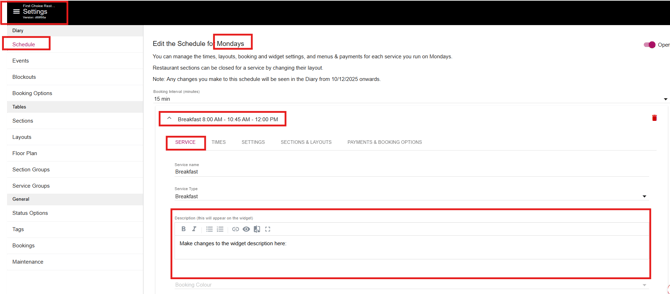
1. Go to your restaurant diary and click the three white lines in the top left corner, then select **Settings**.
2. In your **Schedule**, click on the day for the service you want to edit.
3. Select the specific **service** you'd like to update.
4. Under the **Service** tab, find the **Description** field. Here you can enter or update the description that will appear on your booking widget.
5. You can also add images by including an image link with HTML code (e.g., ` `), and include links to menus or other details. You can resize the image by changing the values for the 'width' and 'height.'
6. Click **Save** when you’re done.
To edit the widget description for a specific **Event** in Now Book It:
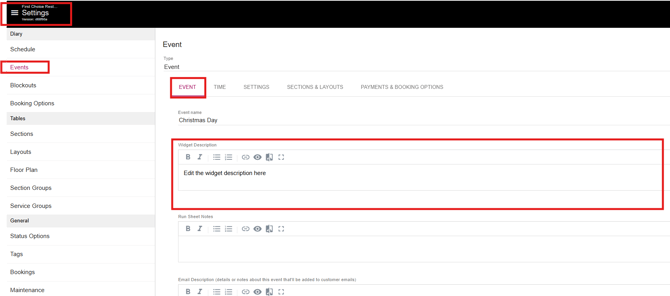
1. Go to your restaurant diary and click the three white lines in the top left corner, then select **Settings**.
2. Click on **Events**
3. Select the specific **Event** you'd like to update.
4. Under the **Event** tab, find the **Description** field. Here you can enter or update the description that will appear on your booking widget.
5. You can also add images by including an image link with HTML code (e.g., ``), and include links to menus or other details. You can resize the image by changing the values for the 'width' and 'height.'
6. Click **Save** when you’re done
- [Get Started](https://help.nowbookit.com/get-started?hsLang=en#main-content)
- [Onboarding and Setup](https://help.nowbookit.com/get-started?hsLang=en#onboarding-and-setup)
- [Your Account and Subscription](https://help.nowbookit.com/get-started?hsLang=en#your-account-and-subscription)
- [User Management](https://help.nowbookit.com/get-started?hsLang=en#user-management)
- [Diary / Bookings / Customers](https://help.nowbookit.com/diary-bookings-customers?hsLang=en#main-content)
- [Managing Bookings](https://help.nowbookit.com/diary-bookings-customers?hsLang=en#managing-bookings)
- [Diary Views and Settings](https://help.nowbookit.com/diary-bookings-customers?hsLang=en#diary-views-and-settings)
- [Floor Plan](https://help.nowbookit.com/diary-bookings-customers?hsLang=en#floor-plan)
- [Blockouts](https://help.nowbookit.com/diary-bookings-customers?hsLang=en#blockouts)
- [Standby List and Wait List](https://help.nowbookit.com/diary-bookings-customers?hsLang=en#standby-list-and-wait-list)
- [Diary Mobile](https://help.nowbookit.com/diary-bookings-customers?hsLang=en#diary-mobile)
- [Customers](https://help.nowbookit.com/diary-bookings-customers?hsLang=en#customers)
- [Booking Options and Services](https://help.nowbookit.com/diary-bookings-customers?hsLang=en#booking-options-and-services)
- [Takeaway](https://help.nowbookit.com/diary-bookings-customers?hsLang=en#takeaway)
- [Events and Special Occasions](https://help.nowbookit.com/events-and-special-occasions?hsLang=en#main-content)
- [Creating and Managing Events](https://help.nowbookit.com/events-and-special-occasions?hsLang=en#creating-and-managing-events)
- [Event Scheduling](https://help.nowbookit.com/events-and-special-occasions?hsLang=en#event-scheduling)
- [Sadie and Integrations](https://help.nowbookit.com/sadie-and-integrations?hsLang=en#main-content)
- [Sadie (AI Assistant)](https://help.nowbookit.com/sadie-and-integrations?hsLang=en#sadie-ai-assistant)
- [POS Integrations](https://help.nowbookit.com/sadie-and-integrations?hsLang=en#pos-integrations)
- [Payment Gateways](https://help.nowbookit.com/sadie-and-integrations?hsLang=en#payment-gateways)
- [Google / Facebook](https://help.nowbookit.com/sadie-and-integrations?hsLang=en#google-facebook)
- [Partner Integrations](https://help.nowbookit.com/sadie-and-integrations?hsLang=en#partner-integrations)
- [Payments and Gift Cards](https://help.nowbookit.com/payments-and-gift-cards?hsLang=en#main-content)
- [Gift Cards](https://help.nowbookit.com/payments-and-gift-cards?hsLang=en#gift-cards)
- [Payments and Refunds](https://help.nowbookit.com/payments-and-gift-cards?hsLang=en#payments-and-refunds)
- [Configuration and Communication](https://help.nowbookit.com/configuration-and-communication?hsLang=en#main-content)
- [Venue Settings](https://help.nowbookit.com/configuration-and-communication?hsLang=en#venue-settings)
- [Email and Communications](https://help.nowbookit.com/configuration-and-communication?hsLang=en#email-and-communications)
- [Booking Customisation](https://help.nowbookit.com/configuration-and-communication?hsLang=en#booking-customisation)
- [Booking Widget Customisation](https://help.nowbookit.com/configuration-and-communication?hsLang=en#booking-widget-customisation)
- [CRM](https://help.nowbookit.com/configuration-and-communication?hsLang=en#crm)
- [NBI Booking Analytics](https://help.nowbookit.com/nbi-booking-analytics?hsLang=en#main-content)
- [Payments](https://help.nowbookit.com/nbi-booking-analytics?hsLang=en#payments)
- [Bookings & Service](https://help.nowbookit.com/nbi-booking-analytics?hsLang=en#bookings-service)
- [Getting Started](https://help.nowbookit.com/nbi-booking-analytics?hsLang=en#getting-started)
[](https://nowbookit.com)
Need more assistance? Speak to a team member over the phone.
- Australia: [1800 265 726](tel:1800265726)
- New Zealand: [0800 453 933](tel:0800453933)
- United States: [1 469 458 6874](tel:14694586874)
- Canada: [1 438 794 9945](tel:14387949945)
- International: [+61 2 7912 1576](tel:61279121576)
[mailto:enquiries@nowbookit.com](mailto:enquiries@nowbookit.com)
[nowbookit.com](https://www.nowbookit.com/)
Copyright © 2026, Now Book It
`), and include links to menus or other details. You can resize the image by changing the values for the 'width' and 'height.'
6. Click **Save** when you’re done.

To edit the widget description for a specific **Event** in Now Book It:
1. Go to your restaurant diary and click the three white lines in the top left corner, then select **Settings**.
2. Click on **Events**
3. Select the specific **Event** you'd like to update.
4. Under the **Event** tab, find the **Description** field. Here you can enter or update the description that will appear on your booking widget.
5. You can also add images by including an image link with HTML code (e.g., ``), and include links to menus or other details. You can resize the image by changing the values for the 'width' and 'height.'
6. Click **Save** when you’re done

- [Get Started](https://help.nowbookit.com/get-started?hsLang=en#main-content)
- [Onboarding and Setup](https://help.nowbookit.com/get-started?hsLang=en#onboarding-and-setup)
- [Your Account and Subscription](https://help.nowbookit.com/get-started?hsLang=en#your-account-and-subscription)
- [User Management](https://help.nowbookit.com/get-started?hsLang=en#user-management)
- [Diary / Bookings / Customers](https://help.nowbookit.com/diary-bookings-customers?hsLang=en#main-content)
- [Managing Bookings](https://help.nowbookit.com/diary-bookings-customers?hsLang=en#managing-bookings)
- [Diary Views and Settings](https://help.nowbookit.com/diary-bookings-customers?hsLang=en#diary-views-and-settings)
- [Floor Plan](https://help.nowbookit.com/diary-bookings-customers?hsLang=en#floor-plan)
- [Blockouts](https://help.nowbookit.com/diary-bookings-customers?hsLang=en#blockouts)
- [Standby List and Wait List](https://help.nowbookit.com/diary-bookings-customers?hsLang=en#standby-list-and-wait-list)
- [Diary Mobile](https://help.nowbookit.com/diary-bookings-customers?hsLang=en#diary-mobile)
- [Customers](https://help.nowbookit.com/diary-bookings-customers?hsLang=en#customers)
- [Booking Options and Services](https://help.nowbookit.com/diary-bookings-customers?hsLang=en#booking-options-and-services)
- [Takeaway](https://help.nowbookit.com/diary-bookings-customers?hsLang=en#takeaway)
- [Events and Special Occasions](https://help.nowbookit.com/events-and-special-occasions?hsLang=en#main-content)
- [Creating and Managing Events](https://help.nowbookit.com/events-and-special-occasions?hsLang=en#creating-and-managing-events)
- [Event Scheduling](https://help.nowbookit.com/events-and-special-occasions?hsLang=en#event-scheduling)
- [Sadie and Integrations](https://help.nowbookit.com/sadie-and-integrations?hsLang=en#main-content)
- [Sadie (AI Assistant)](https://help.nowbookit.com/sadie-and-integrations?hsLang=en#sadie-ai-assistant)
- [POS Integrations](https://help.nowbookit.com/sadie-and-integrations?hsLang=en#pos-integrations)
- [Payment Gateways](https://help.nowbookit.com/sadie-and-integrations?hsLang=en#payment-gateways)
- [Google / Facebook](https://help.nowbookit.com/sadie-and-integrations?hsLang=en#google-facebook)
- [Partner Integrations](https://help.nowbookit.com/sadie-and-integrations?hsLang=en#partner-integrations)
- [Payments and Gift Cards](https://help.nowbookit.com/payments-and-gift-cards?hsLang=en#main-content)
- [Gift Cards](https://help.nowbookit.com/payments-and-gift-cards?hsLang=en#gift-cards)
- [Payments and Refunds](https://help.nowbookit.com/payments-and-gift-cards?hsLang=en#payments-and-refunds)
- [Configuration and Communication](https://help.nowbookit.com/configuration-and-communication?hsLang=en#main-content)
- [Venue Settings](https://help.nowbookit.com/configuration-and-communication?hsLang=en#venue-settings)
- [Email and Communications](https://help.nowbookit.com/configuration-and-communication?hsLang=en#email-and-communications)
- [Booking Customisation](https://help.nowbookit.com/configuration-and-communication?hsLang=en#booking-customisation)
- [Booking Widget Customisation](https://help.nowbookit.com/configuration-and-communication?hsLang=en#booking-widget-customisation)
- [CRM](https://help.nowbookit.com/configuration-and-communication?hsLang=en#crm)
- [NBI Booking Analytics](https://help.nowbookit.com/nbi-booking-analytics?hsLang=en#main-content)
- [Payments](https://help.nowbookit.com/nbi-booking-analytics?hsLang=en#payments)
- [Bookings & Service](https://help.nowbookit.com/nbi-booking-analytics?hsLang=en#bookings-service)
- [Getting Started](https://help.nowbookit.com/nbi-booking-analytics?hsLang=en#getting-started)
[](https://nowbookit.com)
Need more assistance? Speak to a team member over the phone.
- Australia: [1800 265 726](tel:1800265726)
- New Zealand: [0800 453 933](tel:0800453933)
- United States: [1 469 458 6874](tel:14694586874)
- Canada: [1 438 794 9945](tel:14387949945)
- International: [+61 2 7912 1576](tel:61279121576)
[mailto:enquiries@nowbookit.com](mailto:enquiries@nowbookit.com)
[nowbookit.com](https://www.nowbookit.com/)
Copyright © 2026, Now Book It